February 25, 2026
Marketing | SEO | Strategy
Google Business Profile Guide for Local Businesses
Do you remember when the Yellow Pages landed on your doorstep every year?
For decades, that thick directory was the definitive connection between local businesses and the people searching for them. If your business wasn’t listed — or worse, if your listing had the wrong phone number or outdated hours — you were essentially invisible to potential customers. The stakes were high. Being in the Yellow Pages wasn’t optional. It was foundational.
Today, the Yellow Pages is long gone. But the principle remains the same.
Your Google Business Profile is the modern equivalent — and just like the Yellow Pages, being listed isn’t enough. How you show up, how complete your information is, and how actively you manage it determines whether customers find you or your competitor.
The difference? Unlike the Yellow Pages, your Google Business Profile is completely free. And unlike a static directory listing, it’s a dynamic marketing tool that you can update in real time.
What Is a Google Business Profile?
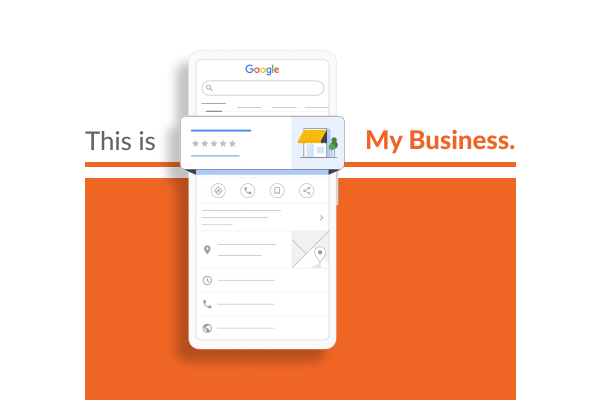
A Google Business Profile (formerly known as Google My Business) is your free business listing that appears across Google Search and Google Maps. When someone searches for your business name, a category you operate in, or a service you offer, your Profile can appear in the results.
Your Profile can display your business name, address, and phone number; hours of operation (including holiday hours); website link; customer reviews and star ratings; photos and videos; service or product categories; frequently asked questions; posts and updates; and booking links, menus, or appointment options depending on your business type.
Here’s the critical part: Google may have already created a listing for your business automatically. The search engine pulls information from public data sources, user submissions, and business directories to create Profiles — whether you know about them or not. And if you haven’t claimed your Profile, you have zero control over what it says.
Step 1: Claim and Verify Your Google Business Profile
Claiming your Profile is not automatic. It’s a required step that verifies you as the business owner and unlocks your ability to manage the listing.
To claim your Profile, visit business.google.com and sign in with a Google account — ideally one tied to your business domain, not a personal Gmail. Search for your business name. If Google already has a listing for you, it will appear in the results — click “Claim this business.” Then complete the verification process. Once verified, fill out every section of your Profile. The more complete it is, the better it will perform in search results.
Verification Methods in 2026
Video verification is the most common method as of 2026. You’ll record a short video showing your business location, signage, and proof of operations. Processing typically takes 3–5 business days.
Postcard verification has Google mailing a code to your business address. It takes 5–14 days to arrive and is less commonly offered than in previous years.
Phone or SMS verification is available for eligible businesses only — you receive a code via call or text for instant verification.
Email verification is available for select businesses, typically those with a business email on the same domain as their verified website.
Instant verification may be available if you’ve already verified your business website through Google Search Console using the same Google account.
Bulk verification is available for businesses with 10 or more locations through a streamlined application process.
If your business doesn’t have a Profile yet, you can create one from scratch through the same portal.
Step 2: Optimize Your Profile for Maximum Visibility
Claiming your Profile is just the beginning. Google’s local search algorithm rewards businesses that maintain complete, accurate, and actively updated Profiles.
Business Information
Make sure your business name, address, and phone number — often called NAP — are accurate and consistent across your website, social media, and other online directories. Choose the most specific business categories that apply to you; Google allows a primary category plus additional secondary ones. Write a compelling business description (up to 750 characters) that clearly explains what you do and who you serve. Write naturally for humans, not for search engines.
Photos and Videos
Upload high-quality images of your storefront, interior, team, products, or work. According to Google’s own data, businesses with photos receive 42% more requests for directions and 35% more clicks to their websites than those without. Add new photos regularly — fresh content signals that your business is active.
Reviews
Encourage satisfied customers to leave reviews. Businesses with higher ratings and more reviews tend to rank better in local search. Respond to every review — positive and negative. Google sees engagement as a signal of an active, customer-focused business. Keep responses professional, personalized, and helpful. This isn’t just for the reviewer — it’s for everyone else reading.
Posts and Updates
Here’s something many business owners don’t realize: you can post updates directly to your Google Business Profile, much like you would on social media. Posts appear in your Profile listing and can include promotions or special offers, upcoming events, new products or services, seasonal announcements, and company news.
How long posts stay visible depends on the type. Update posts remain visible for approximately 6 months. Event posts remain visible until the event end date. Offer posts remain visible until the offer end date. Product posts don’t expire. While Update posts stay up for six months, newer posts push older ones down — so regular posting keeps fresh content at the top of your Profile, signaling to Google that your business is active and engaged.
Questions & Answers
Your Profile has a Q&A section where anyone can ask questions about your business — and anyone can answer them, including you. Monitor this section regularly. Answering questions yourself ensures accuracy and demonstrates responsiveness. You can also proactively post FAQs to preempt common customer questions.
Attributes and Special Features
Depending on your business type, Google may offer additional attributes like wheelchair accessibility, outdoor seating, free Wi-Fi, or designations like “Women-led” or “Veteran-led.” Fill these out. They help customers filter search results and can set you apart from competitors.
Why This Matters: The Google Map Pack
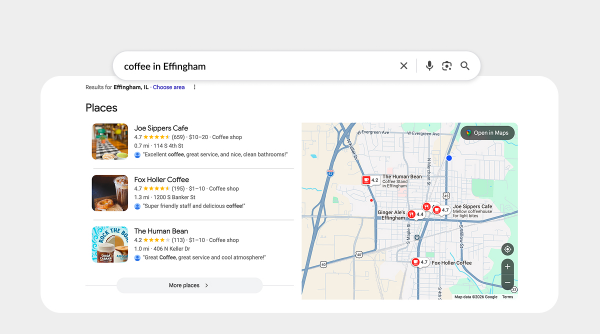
When someone searches for a local business or service — say, “coffee shop near me” or “plumber in Springfield” — Google doesn’t just show a list of websites. It shows a Map Pack: the top three local business results displayed with a map, star ratings, and key information.
The Map Pack appears above organic search results. That means it’s prime real estate — often the first thing users see and click on. Businesses that appear in the Map Pack share a few common traits: complete, optimized Google Business Profiles; consistent NAP information across the web; regular activity (posts, reviews, Q&A); proximity to the searcher’s location; and relevance to the search query.
Your Google Business Profile is the single biggest factor in whether you show up in the Map Pack — and by extension, whether local customers find you.
Common Mistakes to Avoid
Incomplete information. Leaving fields blank signals to Google that your Profile isn’t a priority. Fill out every applicable section.
Inconsistent NAP data. If your business name, address, or phone number varies across your website, social media, and directory listings, it confuses Google and can hurt your rankings.
Ignoring reviews. Unresponded reviews — especially negative ones — make your business look disengaged. Respond to everything, even a simple “Thank you for your feedback.”
Posting once and forgetting about it. Your Profile isn’t a “set it and forget it” tool. Google rewards ongoing activity. Add photos, post updates, and engage with customer questions regularly.
Using a P.O. Box or non-physical address. Google requires service-area businesses (like plumbers or contractors) to either list a physical address or hide their address and specify a service area. P.O. Boxes and virtual offices can get your Profile suspended.
Ongoing Management: Why It’s Worth the Effort
Once your Profile is claimed and optimized, the work isn’t done. Think of it as maintaining a storefront — you wouldn’t let your physical location fall into disrepair, and your Google Business Profile deserves the same attention.
Regular maintenance includes updating hours for holidays or special events, posting seasonal promotions or announcements, responding to new reviews within 24–48 hours, adding fresh photos monthly, monitoring and answering Q&A submissions, and checking your insights to see how customers are finding and interacting with your Profile.
For many business owners, this ongoing work is time-consuming and easy to deprioritize. That’s where professional management comes in. We handle the day-to-day optimization and engagement, ensuring your Profile stays active, accurate, and competitive.
The Bottom Line
Your Google Business Profile is often the very first impression a potential customer has of your business. It’s free, it’s foundational, and when managed well, it’s one of the highest-ROI marketing tools available to local businesses.
If you haven’t claimed your Profile yet, do it today. If you’ve claimed it but haven’t touched it in months, revisit it. And if you want to maximize its potential but don’t have the time to manage it yourself, we can help.
Need Help Optimizing Your Google Business Profile?
At Imagine This! Marketing Group, we specialize in Local SEO and Google Business Profile management. Whether you need a one-time audit and optimization or ongoing monthly management, we can help you show up where your customers are searching.
Want to dive deeper into how local rankings work and what it takes to consistently appear in Google’s Map Pack? Email dnuxoll@thinkcreatedo.com and we’ll set up a time to talk strategy.
Imagine This! Marketing Group is a full-service marketing agency specializing in strategy, creative services, digital marketing, and web development. We help businesses navigate the evolving digital landscape with clarity, expertise, and results-driven solutions.
thinkcreatedo.com | 217.342.2661
Previous Article
Why Local SEO is Important for Your Business